Description
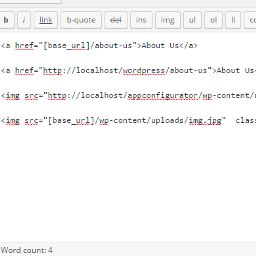
Now its easy to change domains and move your wordpress blog from subdomain to parent domain like from localhost to live domain you just need to use this shortcode [base_url] as your base url and images So now all links and images are fine after transfer site from localhost to live you don’t need to adjust links after change domain.
ShortCode
[base_url]
Screenshots

You can see diffrance in normal link and normal image in wordpress and in link and image with ShorCode.
Installation
** From your WordPress dashboard **
Visit ‘Plugins > Add New’
Search for ‘Relative URL ShortCode’
Activate ‘Relative URL ShortCode’ from your Plugins page.
** From WordPress.org **
Download ‘Relative URL ShortCode’.
Upload the ‘Relative URL ShortCode’ directory to your ‘/wp-content/plugins/’ directory, using your favorite method (ftp, sftp, scp, etc…)
Activate ‘Relative URL ShortCode’ from your Plugins page.
FAQ
-
I need to change something after change domain?
-
No. we always use your site base url so you do not need any configuration for change domain.
-
I need to change any configuration after activate?
-
No. we always use your site base url so you do not need any configuration after activate.
Reviews


Contributors & Developers
“Relative URL ShortCode” is open source software. The following people have contributed to this plugin.
Contributors
Translate “Relative URL ShortCode” into your language.
Interested in development?
Browse the code, check out the SVN repository, or subscribe to the development log by RSS.
Changelog
1.0
- it is a first version.