

Апісанне
You built the product. Why give away 2-5% of every recurring payment to your plugin vendor?
Most WordPress subscription plugins charge per-transaction fees on top of Stripe’s processing costs. That means the more successful your business becomes, the more you pay them. On $10,000/month in recurring revenue, that is $200-500/month leaving your pocket — every single month, forever.
Stripe Subscription Manager charges 0% transaction fees. Zero. On every plan, including free.
You pay Stripe’s standard processing rate. That is it. No revenue sharing. No percentage skimmed off the top. Your growth is yours to keep.
Why SaaS Founders and Membership Operators Choose Stripe Subscription Manager
This is not another payment gateway wrapper. Stripe Subscription Manager is a direct, Stripe-native billing layer for WordPress that uses the same infrastructure powering Shopify, Notion, and Figma.
Stripe-native architecture — Connect via OAuth 2.0, accept payments through Stripe Checkout, let customers self-manage through Stripe Billing Portal, and automate tax compliance with Stripe Tax. No middleware. No abstraction layers. Just Stripe, working the way Stripe intended.
Usage-based (metered) billing — The first WordPress plugin to support Stripe Billing meters for consumption-based pricing. Perfect for AI/API platforms, cloud services, and any SaaS model where customers pay for what they use. Send meter events from your application and let Stripe handle the invoicing.
European payment methods on every plan — Accept iDEAL (Netherlands), Bancontact (Belgium), and SEPA Direct Debit (EU-wide) alongside cards. Apple Pay and Google Pay come standard through Stripe Checkout. No premium upsell required for basic payment method support.
How It Compares
- vs. WooCommerce Subscriptions — No annual license. No transaction fees. Native Stripe Checkout instead of on-site card forms. Usage-based billing included.
- vs. MemberPress / Restrict Content Pro — Stripe-native architecture vs. custom payment processing. Metered billing support. Built-in affiliate tracking. 0% transaction fees.
- vs. building it yourself — Months of Stripe API integration, webhook handling, retry logic, and portal management — done in 5 minutes with a setup wizard.
Everything You Need to Run Subscriptions
- Stripe OAuth 2.0 — Secure account connection. No copy-pasting API keys.
- Stripe Checkout — PCI-compliant, conversion-optimized hosted payment page with Apple Pay and Google Pay.
- Stripe Billing Portal — Customers update cards, switch plans, and view invoices without touching your support team.
- Stripe Tax — Automatic sales tax, VAT, and GST calculation and collection. Stay compliant without spreadsheets.
- Cancellation retention flow — When a customer tries to cancel, present a targeted save offer. Reduce churn before it happens.
- Analytics dashboard — Track MRR, churn rate, revenue trends, and subscriber counts with built-in charts. No third-party analytics tool required.
- Built-in affiliate system — Recruit partners to sell your subscriptions. Track referrals, calculate commissions, and manage payouts from your WordPress dashboard.
- WooCommerce email integration — Six customizable email types managed through WooCommerce Settings for payment confirmations, renewal notices, trial reminders, and more.
- Webhook retry queue — Missed a webhook? The built-in retry system ensures no payment event is lost.
- 14-day free trial — Every paid plan includes a 14-day trial so you can validate the full feature set before committing.
Who Is This For?
- SaaS founders running their marketing site or customer portal on WordPress
- Membership and online course operators who want Stripe-native billing
- Newsletter and content creators selling paid subscriptions
- API and AI service providers who need usage-based billing
- Agencies building subscription-powered sites for clients
- Any WordPress operator tired of paying transaction fees to their plugin vendor
Privacy and Security
Stripe Subscription Manager stores only the minimum data required for subscription management: Stripe customer IDs, subscription references, and OAuth tokens. All payment processing happens on Stripe’s PCI Level 1 certified infrastructure. No card numbers ever touch your server.
OAuth tokens are removed when you disconnect your Stripe account. Full privacy details are available in the plugin settings documentation.
External services
This plugin connects to Stripe to process subscription payments, manage billing, and handle customer data. Stripe is a third-party payment processing platform.
Stripe API
The plugin communicates with Stripe’s API servers (https://api.stripe.com) for:
- Creating and managing subscriptions, customers, and checkout sessions
- Processing recurring payments, refunds, and cancellations
- Managing the Stripe Billing Portal for customer self-service
- Handling webhook events for payment lifecycle notifications
- Calculating tax via Stripe Tax (when enabled)
Data sent to Stripe includes: customer email addresses, subscription plan selections, payment method tokens (handled by Stripe Checkout — no card data touches your server), billing addresses (when required for tax), and usage meter events (for metered billing plans). This data is sent whenever a customer initiates checkout, manages their subscription, or when webhook events are received.
- Stripe Terms of Service: https://stripe.com/legal
- Stripe Privacy Policy: https://stripe.com/privacy
Stripe.js
The plugin loads Stripe’s JavaScript library (https://js.stripe.com/v3/) on checkout pages to redirect customers to Stripe’s hosted payment page (Stripe Checkout). No payment data is collected on your site.
- Stripe.js Terms: https://stripe.com/legal
- Stripe Privacy Policy: https://stripe.com/privacy
Freemius SDK
This plugin uses the Freemius SDK for license management, update delivery, and opt-in anonymous usage tracking. When activated, the SDK may communicate with Freemius servers (https://api.freemius.com) to verify licenses and check for updates. Users are prompted for consent before any usage data is shared.
- Freemius Terms of Service: https://freemius.com/terms/
- Freemius Privacy Policy: https://freemius.com/privacy/
Screenshots
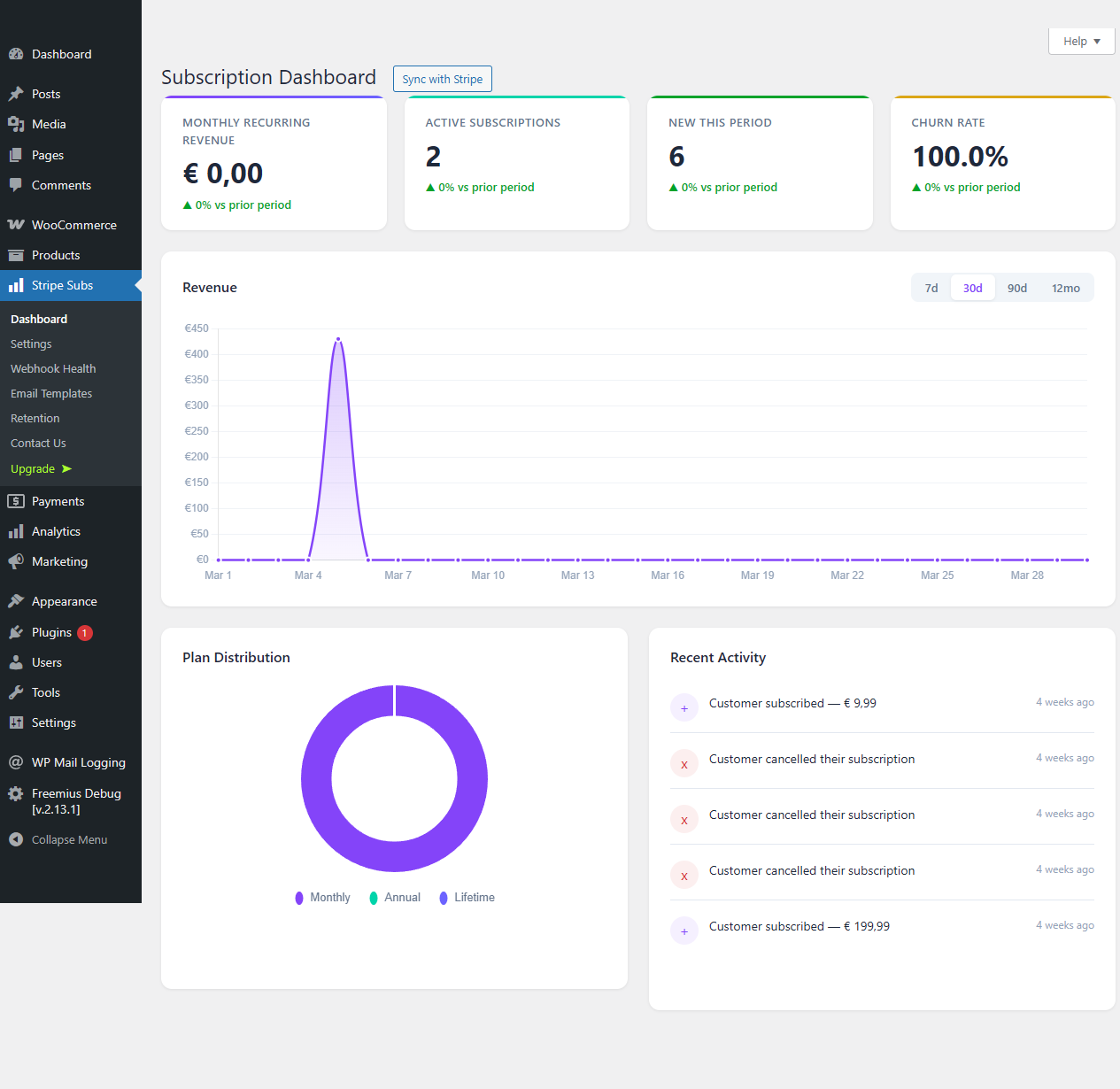
Analytics dashboard showing MRR, churn rate, and revenue trend charts with subscriber KPI cards. 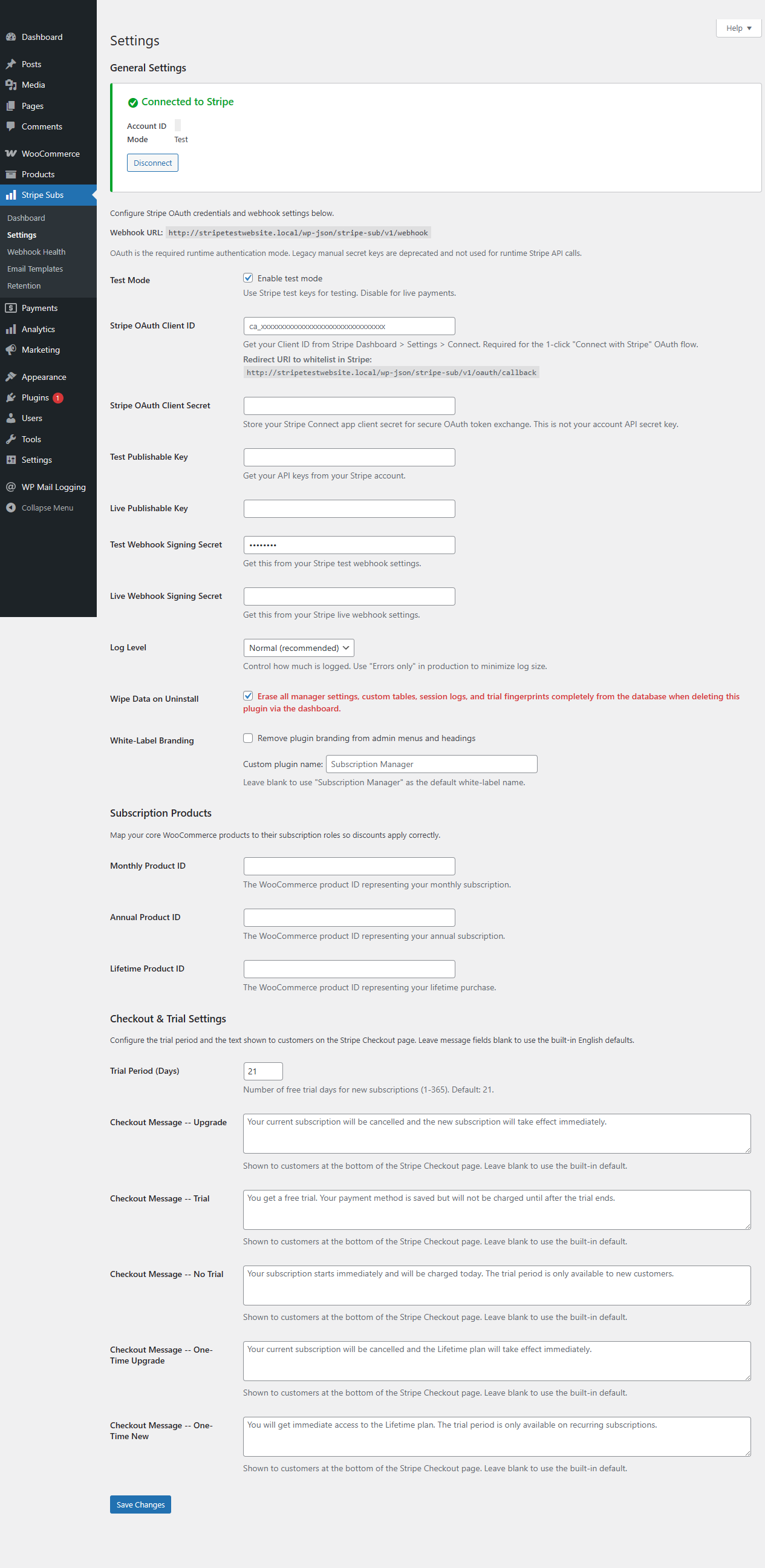
Stripe Checkout payment page with card, iDEAL, Bancontact, and SEPA Direct Debit options. 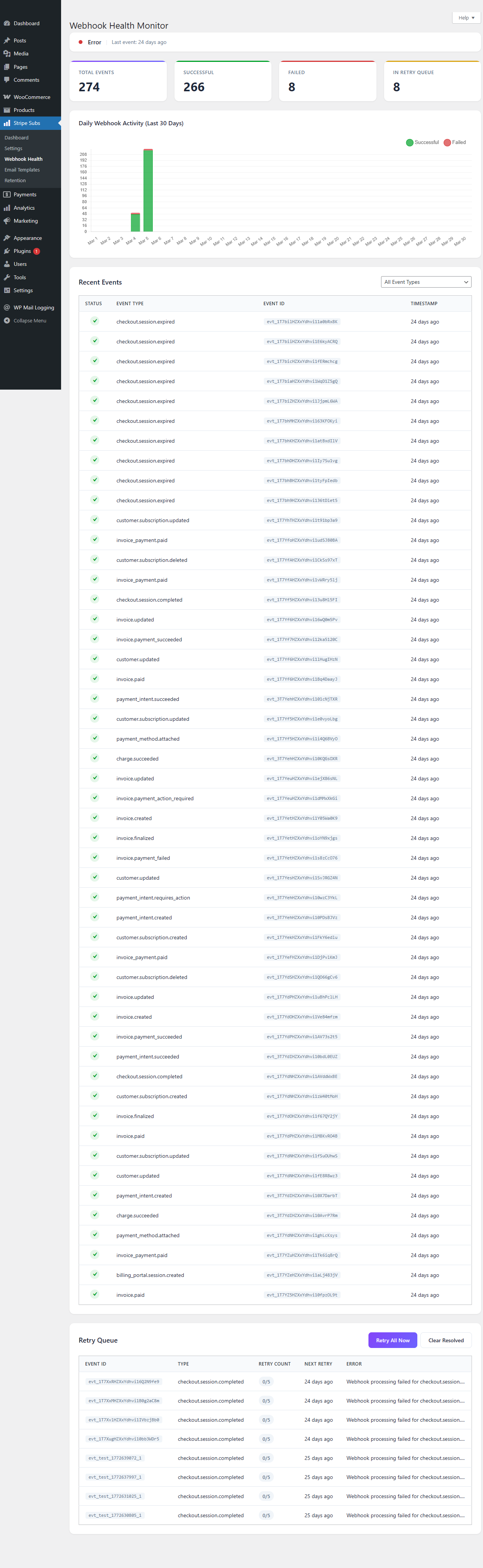
Plugin settings panel with Stripe OAuth connection status, webhook configuration, and payment method toggles. 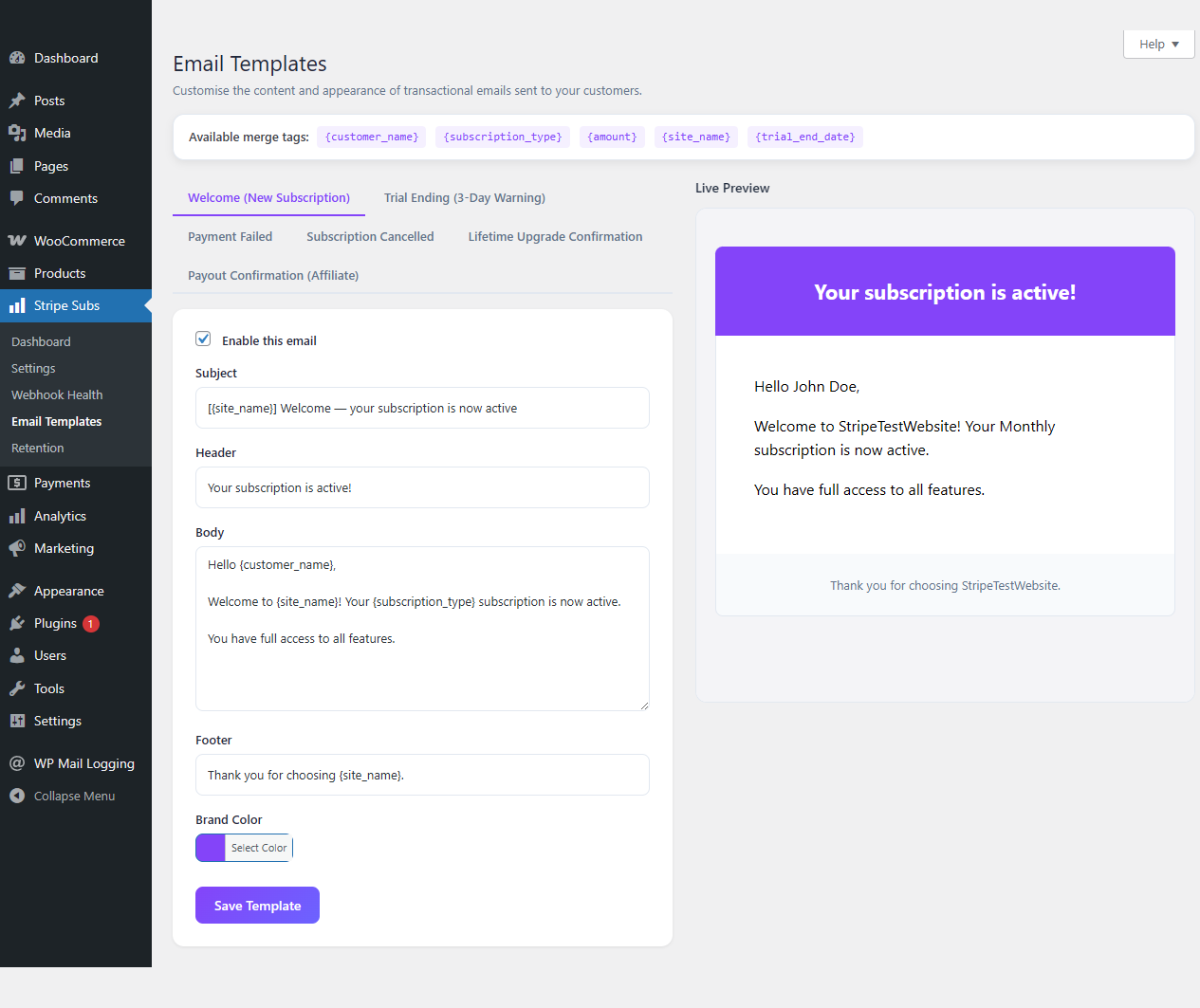
Setup wizard guiding first-time configuration with Stripe account connection and product setup. 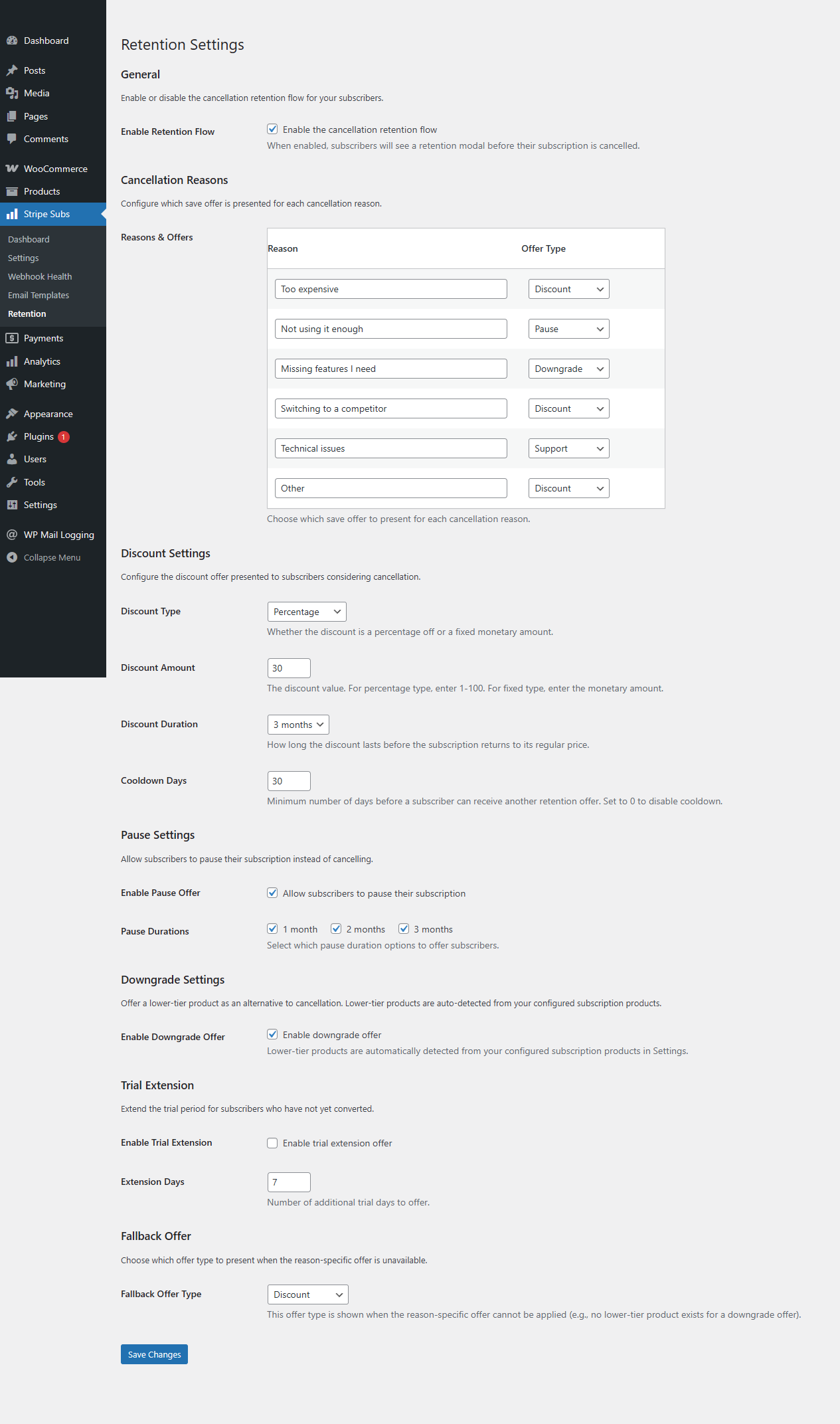
WooCommerce email customizer for subscription payment confirmations, renewal notices, and trial reminders.
Ўсталёўка
- Upload the
stripe-subscription-pluginfolder to/wp-content/plugins/, or install directly through the WordPress plugin screen. - Activate the plugin through the Plugins menu in WordPress.
- Navigate to Stripe Subs in your WordPress admin — the setup wizard will launch automatically on first activation.
- Connect your Stripe account via OAuth 2.0 (the wizard walks you through this step by step).
- Configure your products, pricing, and checkout settings, then run a test transaction in Stripe test mode to verify everything works.
That is it. The setup wizard handles webhook configuration, payment method activation, and Stripe Tax setup automatically.
Часта задаваныя пытанні
-
Does this plugin require WooCommerce?
-
Yes. WooCommerce is required for order management, customer accounts, and email handling. Stripe Subscription Manager extends WooCommerce with Stripe-native subscription billing rather than replacing it.
-
What payment methods are supported?
-
Cards (Visa, Mastercard, Amex, and more), Apple Pay, Google Pay, iDEAL, Bancontact, and SEPA Direct Debit. All payment methods are available on every plan, including free. Payment method availability is handled through Stripe Checkout, so new methods Stripe adds become available automatically.
-
Are there really no transaction fees?
-
Correct. Stripe Subscription Manager charges 0% transaction fees on all plans, including the free tier. You pay only Stripe’s standard processing fees. There is no revenue sharing, no percentage-based commission, and no per-transaction surcharge from us. Ever.
-
How does metered (usage-based) billing work?
-
Metered billing uses Stripe Billing meters. You send usage events from your application to a REST endpoint provided by the plugin. Stripe aggregates usage per billing period and generates an invoice automatically. This is ideal for API calls, AI token consumption, storage usage, bandwidth, or any consumption-based pricing model.
-
How does the 14-day free trial work?
-
All paid plans (Starter, Professional, and Agency) include a 14-day free trial. You get access to the full feature set for your chosen plan. A credit card is required to start the trial. If you do not cancel before the trial ends, your subscription begins automatically.
-
Can customers manage their own subscriptions?
-
Yes. Customers access the Stripe Billing Portal directly from their WooCommerce My Account page. From there they can update payment methods, switch plans, download invoices, and cancel subscriptions — without contacting your support team.
-
How do refunds work?
-
Refunds are processed through Stripe. You can issue full or partial refunds from the Stripe Dashboard or via the Stripe API. The plugin receives the refund webhook event and updates the WooCommerce order status automatically.
-
Does this work on WordPress multisite?
-
Yes. The plugin supports network-activated WooCommerce on WordPress multisite installations. Each site in the network maintains its own Stripe connection and subscription configuration.
-
How is customer payment data secured?
-
No card numbers, bank account details, or sensitive payment data are ever stored on your WordPress server. All payment processing happens on Stripe’s PCI Level 1 certified infrastructure through Stripe Checkout (a hosted payment page). The plugin stores only Stripe customer IDs and subscription references as order metadata.
-
How does Stripe Tax work with this plugin?
-
Stripe Tax is configured through the plugin settings. Once enabled, Stripe automatically calculates and collects the correct sales tax, VAT, or GST based on your customer’s location and your product’s tax category. Tax reports are available in your Stripe Dashboard.
-
What happens when a customer tries to cancel?
-
The cancellation retention flow intercepts the cancel action and presents a configurable save offer — such as a discount, plan downgrade, or pause option. This gives you a chance to retain the customer before the cancellation is finalized. If the customer still wants to cancel, the cancellation proceeds normally through Stripe.
-
Is there a built-in affiliate system?
-
Yes. The companion affiliate add-on lets you create an affiliate program for your subscriptions. Affiliates get unique referral links and coupon codes. The system tracks referrals, calculates commissions on both initial and renewal payments, and provides a payout management interface in your WordPress admin.
Водгукі
На гэты плагін няма водгукаў.
Удзельнікі і распрацоўшчыкі
“Subscription Manager for Stripe” is open source software. The following people have contributed to this plugin.
Удзельнікі

Перакласці “Subscription Manager for Stripe” на вашу мову.
Зацікаўлены ў распрацоўцы?
Праглядзіце код, праверце SVN рэпазітарый, або падпішыцеся на журнал распрацоўкі па RSS.
Журнал змяненняў
2.2.3
- Internal: removed legacy “Lite tier” helper code (volume cap, product limit, related tests) that was already disabled in the WordPress.org build. No user-visible behavior change — the free version has always had no caps on processing volume, products, or sites.
- Internal: distribution build now also excludes the unused un-prefixed Stripe SDK data directory.
2.2.2
- Added upgrade banner on settings page for free-plan users showing what paid plans include.
- Internal: distribution build now excludes development docs and internal README from the plugin zip.
2.2.0
- Added 14-day free trial on all paid plans.
- Added cancellation retention flow with configurable save offers to reduce subscriber churn.
- Enhanced analytics dashboard with MRR trend charts, churn tracking, and revenue breakdowns.
- Improved setup wizard with streamlined Stripe OAuth connection and automatic webhook configuration.
- Updated Freemius SDK integration with fail-closed plan checks for premium feature security.
- Fixed churn rate calculation to correctly match webhook handler subscription status values.
- Fixed currency symbol handling across webhook processing, renewal emails, and email previews.
- Replaced all JavaScript alert dialogs with styled inline notice elements for improved admin UX.
- Full internationalization pass with 579+ translatable strings and .pot file generation.
2.1.0
- Fixed churn rate always showing 0% — analytics query now matches the webhook handler’s spelling of ‘cancelled’.
- Fixed invalid payout date fallback producing 1970-01-01 when admin submitted empty date.
- Fixed missing
strp_sub_webhook_logtable cleanup in uninstall.php. - Fixed missing
retrieve_coupon()method on the Stripe API class. - Fixed payout partial state corruption — DB insert now runs before balance decrement.
- Fixed hardcoded currency symbols in webhook commission reversal, renewal email, and email customizer preview.
- Fixed XSS via
.html()in analytics dashboard JS — replaced with safe DOM methods. - Fixed unescaped HTML entities in KPI cards — now wrapped in
wp_kses_post(). - Replaced 11
alert()calls with styled inline notice elements across admin and frontend JS. - Fixed hardcoded English labels in analytics and affiliate JS — now localized via
wp_localize_script(). - Wrapped Freemius plan labels and OAuth UI strings in translation functions.
- Added
.potfile with 579 translatable strings. - Added
index.phpdirectory listing prevention to all 14 plugin subdirectories.
2.0.5
- Made Stripe Checkout custom_text messages configurable with i18n support.
- Made trial period configurable (1-365 days).
- Added extensibility hooks on Stripe Checkout session data before API calls.
- Added WooCommerce Email integration with six customizable email types.
- Decoupled webhook handler email dispatch via action hooks.
2.0.4
- Rewrote all email methods to use self-contained wp_mail() with translatable strings.
- Fixed transient lock leak in checkout session handler.
- Removed blocking sleep loop in concurrency handler.
- Replaced hardcoded Dutch URLs with portable WordPress page URL helpers.
- Added function_exists guards for affiliate integration calls.
2.0.3
- Replaced fatal legacy email function calls with wp_mail() and translatable strings.
- Fixed hardcoded Dutch coupon name and admin notices.
- Removed side-effects from sanitize_settings() callback.
2.0.2
- Standardised text domain to stripe-sub-manager across all files.
- Added idempotency key support for meter events.
- Added Stripe Meter Event Name field to metered-billing product meta box.
2.0.1
- Hardened OAuth-first runtime: legacy secret keys no longer persisted.
- Added privacy section and commercial operations documentation.
2.0.0
- Added OAuth-based Stripe connection flow.
- Added Stripe Billing meter-event usage endpoint.
- Added Stripe Customer Portal integration.
- Added webhook retry subsystem.