
Апісанне
CheckoutCue Payments for WooCommerce adds two independent hosted payment methods to WooCommerce:
- PayPal checkout using the PayPal Orders API v2.
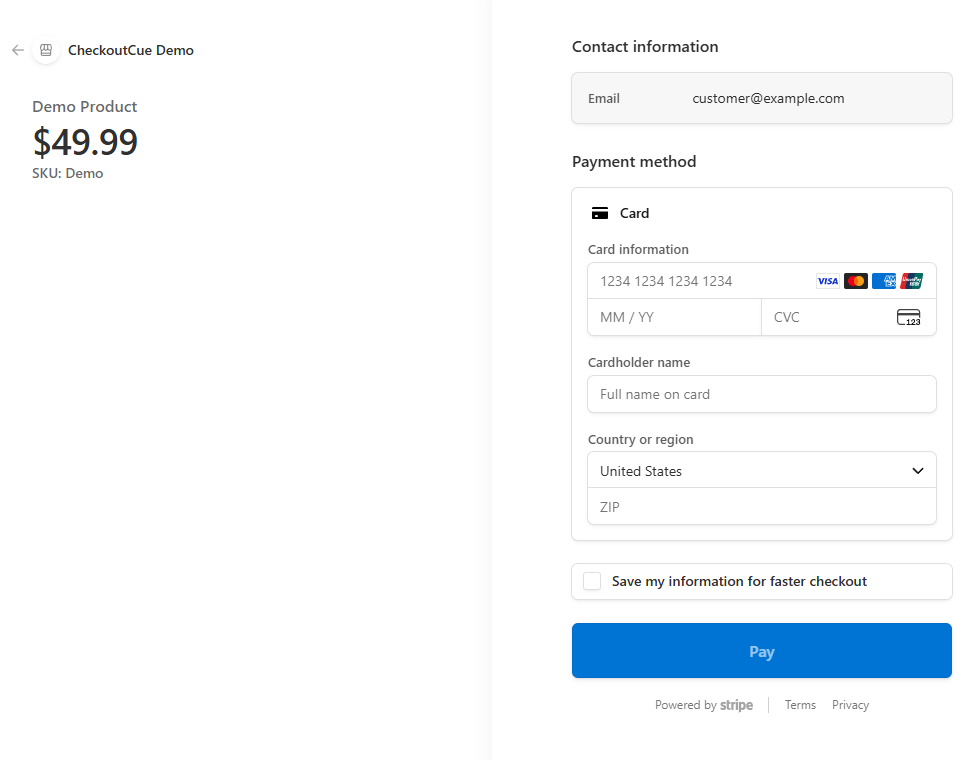
- Card payments using Stripe-hosted Checkout.
Store owners can enable either gateway or both. PayPal and Stripe use separate settings, credentials, order metadata, and payment flows.
PayPal features:
- Redirect customers to PayPal and capture approved payments after they return to WooCommerce.
- Use separate Sandbox and Live PayPal REST API credentials.
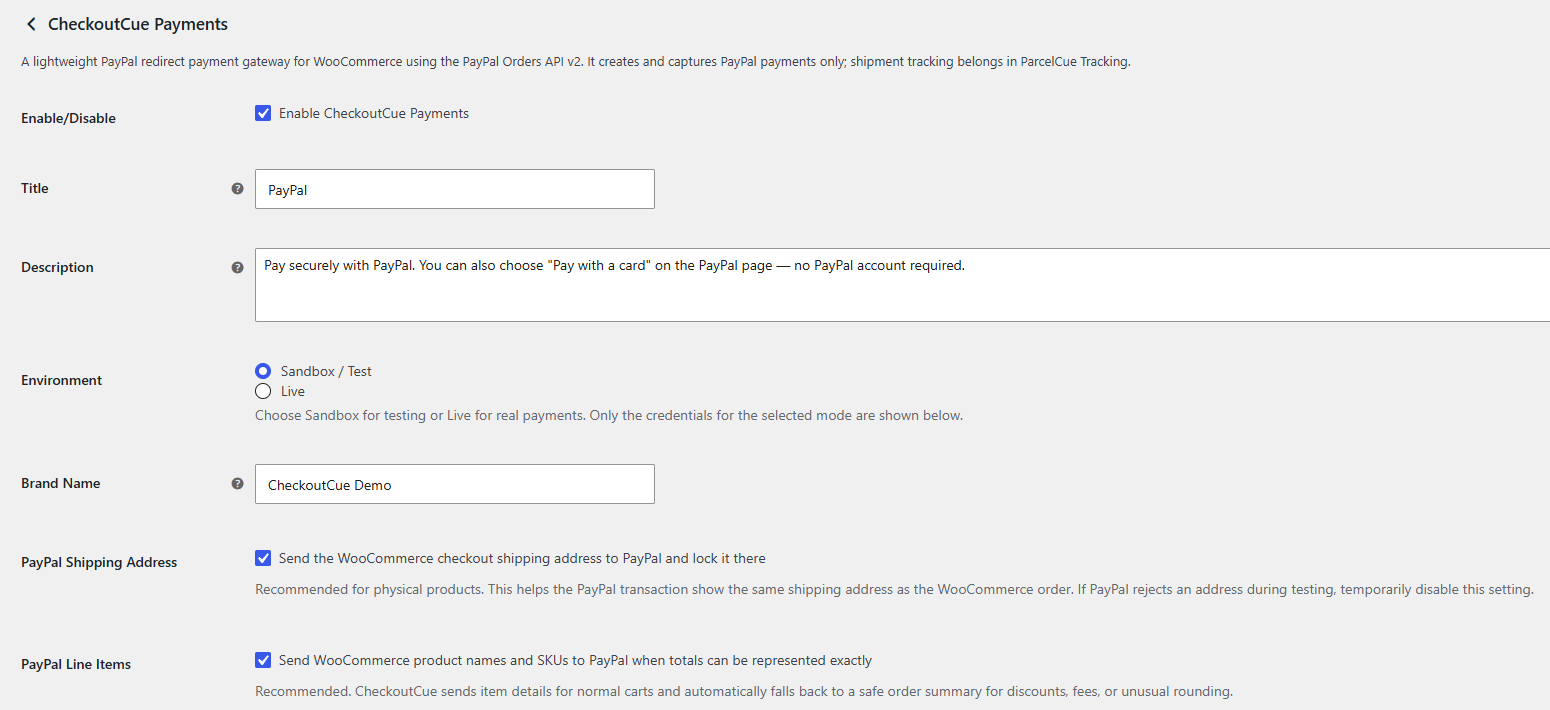
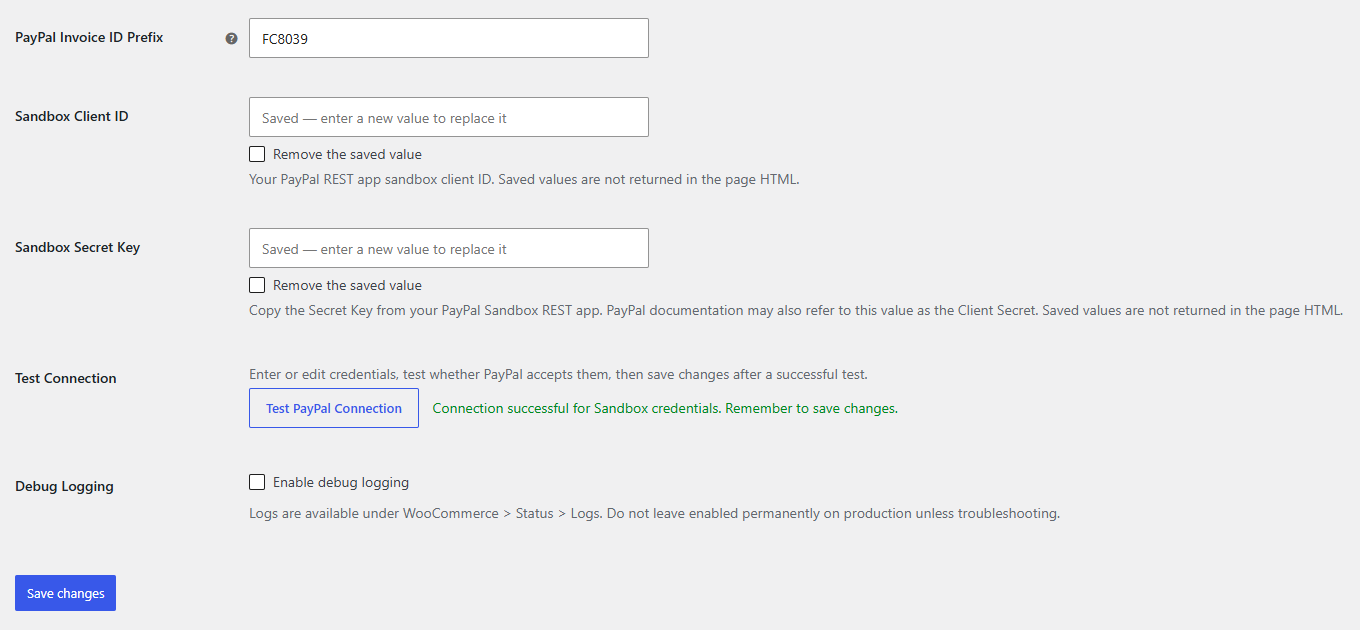
- Test PayPal credentials from the WooCommerce payment settings screen.
- Replace or explicitly remove saved PayPal Sandbox and Live credentials without exposing saved values in the settings-page HTML.
- Verify the PayPal order ID, captured amount, and currency before marking an order paid.
- Send product line items and SKUs when the order can be represented exactly.
- Optionally send and lock the WooCommerce shipping address at PayPal.
- Generate a saved invoice ID prefix for stores sharing one PayPal account.
Stripe features:
- Redirect customers to Stripe-hosted Checkout for one-time card payments.
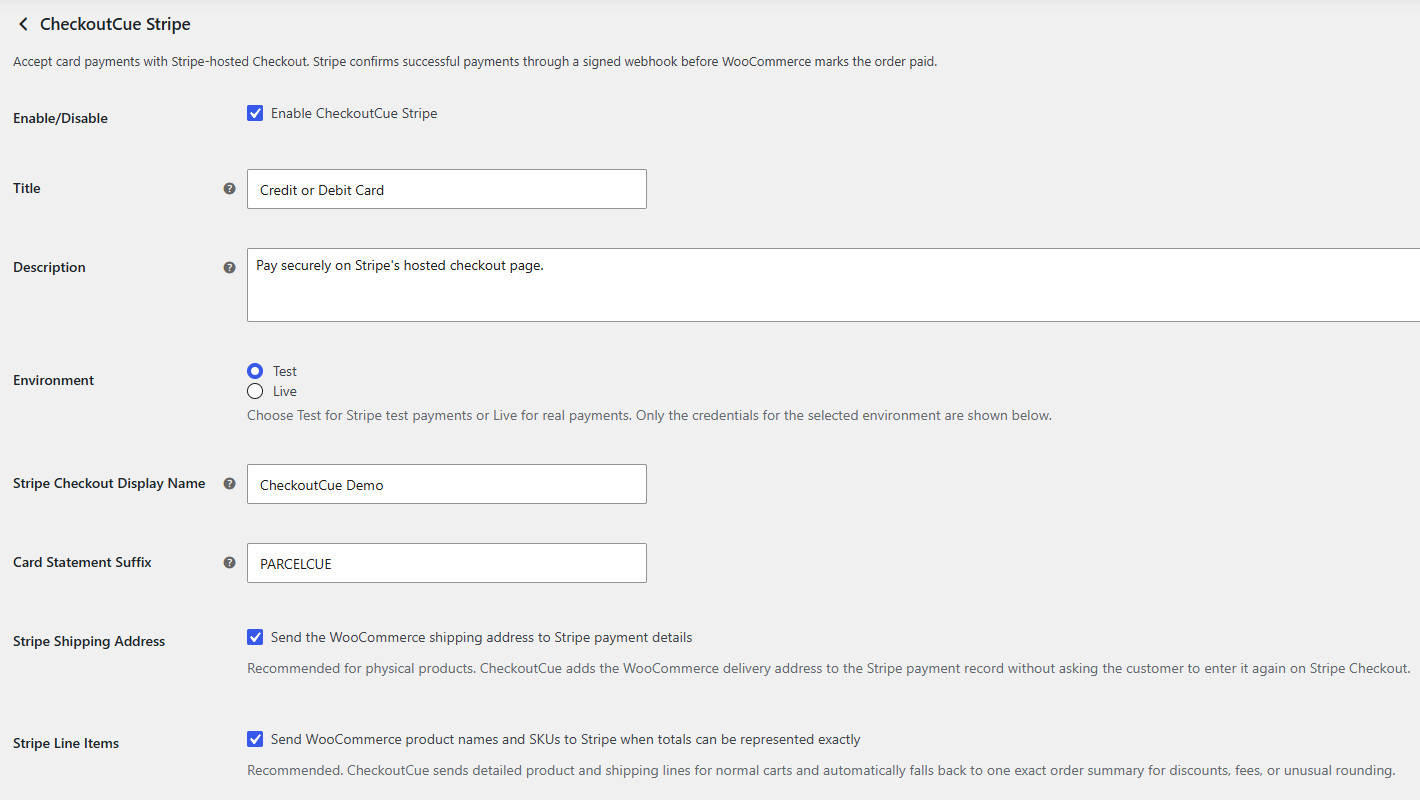
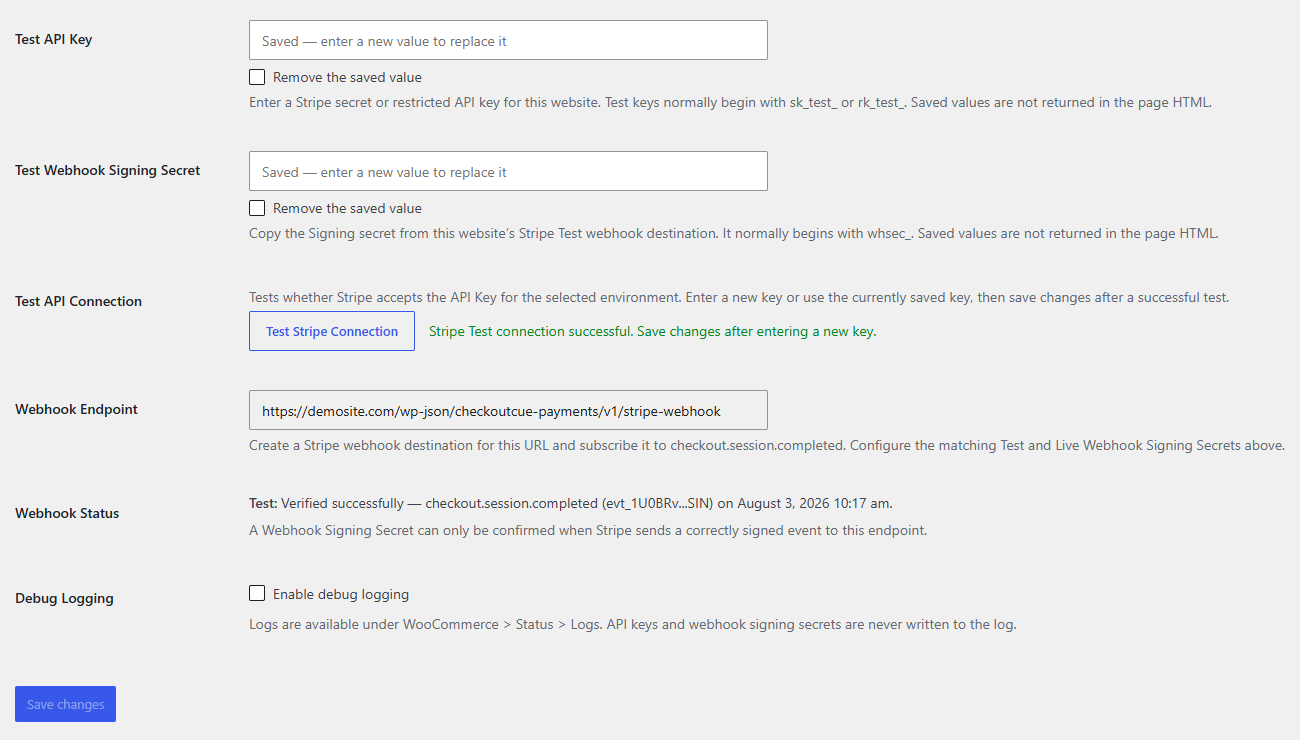
- Use separate Test and Live Stripe API keys and webhook signing secrets, with environment-specific credential fields.
- Set a site-specific display name at the top of Stripe Checkout.
- Set an optional site-specific card statement descriptor suffix.
- Test the selected Stripe API key from WooCommerce settings.
- Show the last correctly signed Test or Live webhook received by the site.
- Optionally add the WooCommerce shipping address to Stripe payment details.
- Send product names and SKUs when totals can be represented exactly, with an automatic exact-total fallback.
- Confirm payment only through a signed Stripe webhook.
- Verify the WooCommerce order ID, Checkout Session, environment, amount, currency, and Stripe payment status before marking an order paid.
- Reuse an open Checkout Session and use a per-order payment-attempt idempotency key.
- Ignore already processed Stripe webhook event IDs.
- Identify the originating website and safely acknowledge signed events created by another CheckoutCue site using the same Stripe account.
Shared features:
- Support simple, variable, virtual, and downloadable WooCommerce products.
- Support coupons, taxes, shipping, fees, multiple quantities, and mixed carts through the verified WooCommerce order total.
- Support WooCommerce High-Performance Order Storage (HPOS).
- Support WooCommerce classic checkout and checkout blocks.
- Provide optional WooCommerce logging without writing payment credentials to logs.
CheckoutCue Payments intentionally stays narrow. It does not add subscriptions, saved payment methods, card vaulting, inline card fields, manual capture, refunds, disputes, buy-now-pay-later methods, or shipment tracking.
For shipment tracking and PayPal tracking sync after an order has been paid, use ParcelCue Tracking for WooCommerce.
CheckoutCue Payments is developed by StoreOpsWP. It is not developed, endorsed, or supported by PayPal or Stripe.
Third-Party Services
CheckoutCue Payments connects directly from the merchant’s WooCommerce website to PayPal and/or Stripe when the corresponding gateway is configured and used.
PayPal
Service provider: PayPal
Service used: PayPal REST API, including OAuth token requests and Orders API v2 order creation/capture endpoints
Service URLs:
- https://api-m.paypal.com
- https://api-m.sandbox.paypal.com
CheckoutCue sends data to PayPal when a store administrator tests credentials and when a customer chooses the PayPal gateway during checkout. Saved PayPal credentials are not returned in the settings-page HTML.
Data sent to PayPal may include:
- PayPal REST API Client ID and Secret Key when testing credentials or requesting an access token. PayPal documentation may also call the Secret Key the Client Secret.
- WooCommerce order ID, invoice ID, currency, and order total.
- Product names, SKUs, quantities, and prices when line item transfer is enabled and the order can be represented exactly.
- Shipping name and address when shipping-address transfer is enabled.
- Return and cancel URLs so PayPal can send the customer back to the WooCommerce store.
PayPal terms and privacy information:
- PayPal User Agreement: https://www.paypal.com/legalhub/paypal/useragreement-full
- PayPal Privacy Statement: https://www.paypal.com/privacy
Stripe
Service provider: Stripe
Service used: Stripe API and Stripe-hosted Checkout
Service URLs:
- https://api.stripe.com
- https://checkout.stripe.com
CheckoutCue sends data to Stripe when a customer chooses the Stripe gateway and the plugin creates or retrieves a hosted Checkout Session.
Data sent to Stripe may include:
- The merchant’s selected Stripe Test or Live API Key, which can be a secret or restricted key, in the authenticated server-to-server API request.
- WooCommerce order ID and order number.
- Final order amount and currency.
- Customer billing email.
- WooCommerce product names, SKUs, quantities, and shipping lines when detailed line-item transfer is enabled and exact.
- WooCommerce delivery name, address, and phone when shipping-address transfer is enabled.
- Store URL, a non-secret website identifier, CheckoutCue version, payment environment, and payment attempt number in Stripe metadata.
- The configured Stripe Checkout display name and card statement suffix.
- WooCommerce success and cancellation URLs.
Stripe sends signed webhook events to the merchant’s configured WooCommerce webhook endpoint. CheckoutCue verifies the signature using the merchant’s saved Webhook Signing Secret. Stripe credentials are stored in the merchant’s WordPress/WooCommerce settings and are not sent to StoreOpsWP.
Stripe terms and privacy information:
- Stripe Services Agreement: https://stripe.com/legal/ssa
- Stripe Privacy Policy: https://stripe.com/privacy
Screenshots
Ўсталёўка
- Upload the plugin ZIP through Plugins > Add New > Upload Plugin, or install it from WordPress.org when available.
- Activate the plugin.
- Go to WooCommerce > Settings > Payments.
- Configure CheckoutCue Payments for PayPal, CheckoutCue Stripe, or both.
- Save the matching Test/Sandbox or Live credentials for each enabled gateway.
- Complete a test order before accepting Live payments.
Stripe setup
- Open WooCommerce > Settings > Payments > CheckoutCue Stripe.
- Select Test or Live mode.
- Enter the matching Stripe Test or Live API Key. Secret and restricted API keys are supported.
- Copy the Webhook Endpoint shown by CheckoutCue.
- In Stripe, create a webhook destination for that endpoint and subscribe it to
checkout.session.completed. - Paste the destination’s matching Test or Live Webhook Signing Secret into CheckoutCue.
- Optionally set the Stripe Checkout Display Name and Card Statement Suffix.
- Test the selected Stripe API connection.
- Enable the gateway and save changes.
- Place a Stripe test order and confirm that Webhook Status records a verified event and the signed webhook marks the WooCommerce order paid.
Часта задаваныя пытанні
-
Can I enable PayPal and Stripe at the same time?
-
Yes. They are separate WooCommerce payment gateways with separate credentials and settings.
-
Will upgrading change my existing PayPal settings or payment flow?
-
No. Version 1.1.0 added Stripe as a separate optional gateway, and version 1.1.1 only polishes the isolated Stripe module. The existing PayPal gateway ID, settings, credentials, and payment logic remain in place.
-
Does the PayPal gateway require a PayPal Business account?
-
Yes. You need PayPal REST API credentials from a PayPal Business account.
-
Does the Stripe gateway require a Stripe account?
-
Yes. The store owner supplies credentials for their own Stripe account. No StoreOpsWP account is required, and StoreOpsWP does not receive the merchant’s Stripe credentials.
-
Does Stripe Checkout display my site-specific brand name?
-
The optional Stripe Checkout Display Name is sent for each Checkout Session and is intended for the heading at the top of Stripe-hosted Checkout. Your Stripe account’s legal or public business details can still appear in receipts, terms, card statements, or other customer-facing locations.
-
What is the Card Statement Suffix?
-
It is an optional short site identifier added to the Stripe account’s statement descriptor for card payments. The Stripe account descriptor or shortened prefix still remains part of the final statement text, and banks can format or truncate it.
-
Why is a Stripe webhook required?
-
The customer returning to the WooCommerce thank-you page is not accepted as proof of payment. CheckoutCue verifies Stripe’s signature over the raw webhook body and completes the order only after validating the paid Checkout Session.
-
Which Stripe event is required?
-
CheckoutCue requires
checkout.session.completedfor the hosted card payment journey. -
Does Stripe Checkout create an itemized product list?
-
When enabled, CheckoutCue sends product names, SKUs, quantities, and shipping lines when the final WooCommerce total can be represented exactly. It automatically falls back to one exact order-summary line for discounts, fees, or unusual rounding.
-
Does the Stripe gateway support refunds from WooCommerce?
-
No. Refunds should be issued in Stripe and then recorded in WooCommerce as needed.
-
Does the PayPal gateway support refunds from WooCommerce?
-
No. Refunds should be handled in PayPal and then recorded in WooCommerce as needed.
-
Does this plugin support WooCommerce Blocks checkout?
-
Yes. CheckoutCue registers independent PayPal and Stripe payment methods when WooCommerce Blocks payment integrations are available.
-
Does this plugin sync shipment tracking?
-
No. CheckoutCue is a payment gateway plugin. Use ParcelCue Tracking for WooCommerce if you need shipment tracking and PayPal tracking sync.
Водгукі
На гэты плагін няма водгукаў.
Удзельнікі і распрацоўшчыкі
“CheckoutCue Payments for WooCommerce” is open source software. The following people have contributed to this plugin.
Удзельнікі
Перакласці “CheckoutCue Payments for WooCommerce” на вашу мову.
Зацікаўлены ў распрацоўцы?
Праглядзіце код, праверце SVN рэпазітарый, або падпішыцеся на журнал распрацоўкі па RSS.
Журнал змяненняў
1.1.8
- Rename PayPal credential labels from Client Secret to Secret Key to match the current PayPal dashboard, while noting that PayPal documentation may also call it the Client Secret.
- Rename Stripe credential labels to API Key and Webhook Signing Secret for clearer setup guidance.
- Keep all saved option IDs, credentials, PayPal and Stripe payment logic, checkout behavior, API requests, and webhook processing unchanged.
1.1.7
- Maintenance release ensuring the complete tested plugin file set is included in the WordPress.org package.
- Keep all PayPal and Stripe settings, checkout, API, webhook, and payment-processing behavior unchanged.
1.1.6
- Use a straight English apostrophe in the default Stripe checkout description:
Pay securely on Stripe's hosted checkout page. - Automatically update only saved Stripe descriptions that still exactly match the previous default; merchant-customized descriptions remain unchanged.
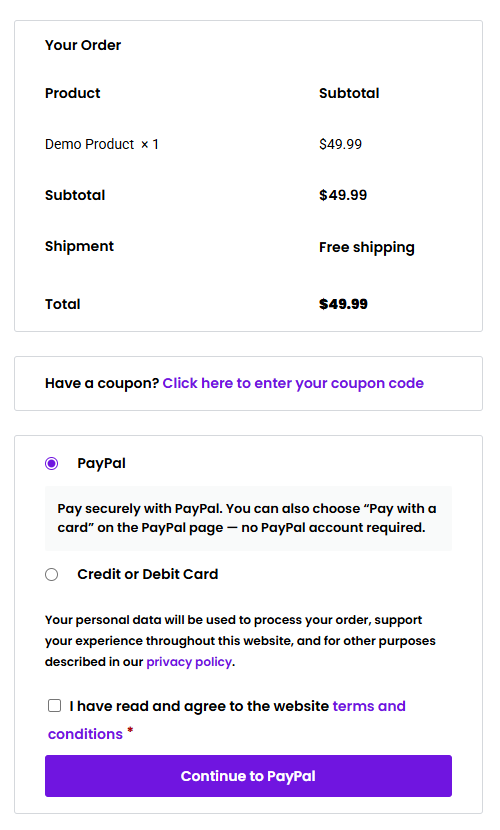
- Update the WordPress.org screenshot captions for the six-image PayPal-first and Stripe-second screenshot sequence.
- Keep all PayPal and Stripe payment processing behavior unchanged.
1.1.5
- Replace
wc_clean()with the WordPress-recognizedsanitize_text_field( wp_unslash() )pattern for the Stripe cancel-return order key, resolving the Plugin Check input-sanitization warning. - Keep the existing WooCommerce order-key comparison and all PayPal and Stripe payment behavior unchanged.
1.1.4
- Change the default customer-facing PayPal payment title from
PayPal / Credit or Debit CardtoPayPal. - Use straight English double quotation marks around “Pay with a card” in the default PayPal description.
- Automatically update only previously saved values that still exactly match the former defaults; merchant-customized titles and descriptions remain unchanged.
1.1.3
- Add a non-secret per-site identifier to new Stripe Checkout Session and PaymentIntent metadata.
- Safely acknowledge and ignore correctly signed
checkout.session.completedevents that belong to another CheckoutCue website using the same Stripe account or sandbox. - Retain the existing
site_urlmetadata as a backwards-compatible multi-site identifier for sessions created by v1.1.1. - Add explicit removal checkboxes for saved PayPal Sandbox and Live Client IDs and Client Secrets.
- Stop returning saved PayPal credentials in the settings-page HTML while preserving blank-field replacement and connection testing with saved values.
1.1.1
- Change the Stripe environment setting to Test/Live radio buttons and show only the selected environment’s credential fields.
- Add a Stripe API connection test that can use a newly entered or already saved Secret Key.
- Add separate Test and Live webhook verification diagnostics.
- Add optional WooCommerce shipping-address transfer to Stripe payment details without recollecting the address on Stripe Checkout.
- Add optional detailed Stripe product names, SKUs, quantities, and shipping lines with automatic exact-total fallback.
- Update the Card Statement Suffix guidance to use neutral examples such as PARCELCUE and STOREOPS.
- Keep the existing PayPal gateway implementation and assets unchanged.
1.1.0
- Add an optional Stripe-hosted Checkout gateway with gateway ID
checkoutcue_stripe. - Add separate Stripe Test and Live API key and webhook signing-secret settings.
- Add a per-site Stripe Checkout display name and card statement descriptor suffix.
- Add signed raw-body webhook verification for
checkout.session.completed. - Verify Stripe order metadata, Checkout Session ownership, environment, payment status, currency, and amount before completing the WooCommerce order.
- Add Checkout Session reuse, payment-attempt idempotency, processed-event deduplication, Stripe order metadata, logs, classic checkout support, and Checkout Block support.
- Keep the existing PayPal gateway ID, settings, classes, assets, and payment logic unchanged.
1.0.10
- Update WordPress.org screenshot captions for the checkout page, settings, credentials test, and successful order view.
1.0.9
- Hide the default WooCommerce notice icon only for the CheckoutCue payment-cancelled checkout notice.
- Clear stale WooCommerce checkout loading overlays when a customer returns from PayPal with the browser Back button.
1.0.7
- Replace the invoice ID prefix generator so it creates a saved random uppercase prefix without using WordPress authentication salts, cookies, or keys.
1.0.6
- Add translator comments for payment-capture messages.
- Remove manual text-domain loading because WordPress.org loads hosted plugin translations automatically.
- Add inline coding-standard notes for PayPal return and WooCommerce settings query parameters.
1.0.5
- Update saved default gateway descriptions from earlier pre-release builds when they still use the previous default wording. Custom merchant descriptions are preserved.
1.0.4
- Update the customer-facing payment method description to clearly mention the Pay with a card option on the PayPal page.
1.0.3
- Fix PayPal capture requests so the approved sandbox or live payment can be captured correctly after the buyer returns from PayPal.
1.0.2
- Remove the Plugin URI from the plugin header until the dedicated CheckoutCue product page is ready. The Author URI remains set to StoreOpsWP.
1.0.1
- Change the automatically generated PayPal invoice ID prefix to a shorter 6-character uppercase prefix.
- Update invoice ID prefix wording in the payment gateway settings.
1.0.0
- Initial release.